


Download Celtx Shots – Professional Storyboard & Pre‑Vis Tool for Video Production
Overview
Celtx Shots is a purpose‑built storyboard application designed to streamline every stage of video production, from concept to on‑set execution. By allowing creators to attach reference images, annotate camera angles, and sketch lighting setups directly within a visual timeline, the software eliminates the guesswork that often leads to costly reshoots. Its integrated animatic feature converts storyboard panels into a rough video preview, giving directors and cinematographers a clear sense of pacing before a single take is filmed. In addition, Celtx Shots offers seamless cloud syncing, so you can back up projects and access them from any mobile device—perfect for location scouting or last‑minute revisions on set. Whether you’re a seasoned filmmaker, a commercial videographer, or an indie creator working on a YouTube series, Celtx Shots provides a secure, intuitive environment to plan, visualize, and communicate your vision with the entire production crew.
Key Features
- Visual Storyboarding: Drag‑and‑drop images, sketches, or clip‑art onto a timeline to build shot sequences.
- Camera & Lighting Details: Assign focal length, lens type, camera movement, and lighting diagrams to each frame.
- Animatic Export: Turn storyboard panels into a low‑resolution video preview with customizable timing.
- Cloud Sync & Mobile Access: Projects automatically back up to Celtx’s secure servers and sync with iOS and Android apps.
- Collaboration Tools: Share boards with teammates, add comments, and lock sections to prevent accidental changes.
- Export Options: Export to PDF, CSV, or Final Draft formats for easy hand‑off to editors, producers, or investors.
- Template Library: Pre‑made storyboard templates for commercials, short films, and multi‑camera shoots.
- Version History: Track revisions with a full audit trail, allowing you to revert to previous drafts.
- Secure File Management: End‑to‑end encryption ensures your pre‑vis assets remain private.
Installation, Usage & Compatibility
Installing Celtx Shots is straightforward. Visit the official Celtx website, locate the “Shots” download page, and select the installer for your operating system. Windows users download a .exe file, macOS users receive a .dmg package, while iOS and Android users can find the app in the Apple App Store or Google Play Store respectively. The installer guides you through standard steps—accepting the license agreement, choosing an install location, and creating a shortcut on your desktop or start menu.
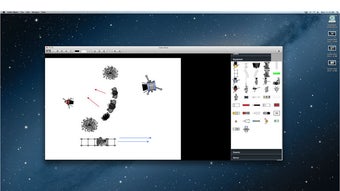
Once installed, launch Celtx Shots and sign in with your Celtx account (or create one for free). The first‑time setup wizard walks you through creating a new project, selecting a template, and importing reference images. The interface is divided into three primary panels: a media library on the left, a storyboard canvas in the center, and a properties inspector on the right. To add a shot, simply drag an image from the library onto the canvas, then use the inspector to define camera angle, lens, and lighting details. You can also sketch directly on the canvas using the built‑in drawing tools or choose from a library of clip‑art lighting rigs.
Celtx Shots supports Windows 10 or later, macOS 10.15 (Catalina) and newer, iOS 13+, and Android 8.0+. System requirements are modest: a dual‑core processor, 4 GB RAM, and at least 500 MB of free disk space. For optimal performance, especially when rendering animatics, a graphics‑accelerated GPU is recommended but not mandatory.
After building your storyboard, you can generate an animatic by clicking the “Export Animatic” button. Choose a frame‑rate (commonly 24 fps for film) and export format (MP4 or MOV). The resulting video can be previewed within the app or shared directly with collaborators via a secure link. Because projects sync automatically, any edits you make on your desktop instantly appear on your mobile device, allowing you to review the storyboard on set without carrying a laptop.
Pros and Cons
Pros
- Intuitive drag‑and‑drop interface reduces learning curve.
- Comprehensive camera and lighting metadata for each shot.
- Animatic generation saves time before actual filming.
- Cross‑platform support and seamless cloud sync.
- Robust collaboration features with comment threads and version control.
- Secure, encrypted storage protects intellectual property.
Cons
- Advanced features (e.g., high‑resolution animatics) require a paid subscription.
- Limited third‑party plugin ecosystem compared to some high‑end VFX suites.
- Mobile app lacks full editing capabilities; primarily for review.
- Export formats are limited to PDF, CSV, MP4, and MOV; no native Premiere Pro integration.
Frequently Asked Questions
Can I use Celtx Shots for free?
Yes, Celtx offers a free tier that includes basic storyboard creation, cloud sync, and limited export options. Advanced features like high‑resolution animatics and team collaboration tools require a paid subscription.
Is my data safe when syncing to the cloud?
Celtx employs end‑to‑end encryption for all file transfers and stores data on secure, GDPR‑compliant servers. Users can also enable two‑factor authentication for added protection.
Can I import existing storyboards from other apps?
Celtx Shots supports import of PDF, CSV, and Final Draft files. While the import process preserves most layout information, you may need to adjust camera and lighting annotations manually.
How does the animatic export work?
After arranging your storyboard panels, click “Export Animatic,” choose your desired frame‑rate and resolution, and select MP4 or MOV as the output format. The app automatically stitches the panels together and adds any audio cues you’ve attached.
Is there a limit to how many projects I can store?
The free plan includes up to 5 active projects with a total storage cap of 1 GB. Paid subscriptions increase both the project count and storage space, with the premium tier offering unlimited projects and 10 GB of cloud storage.
Final Verdict & Call to Action
Celtx Shots fills a critical niche for filmmakers who need a reliable, visual planning tool that bridges the gap between script and shoot. Its blend of intuitive storyboard creation, detailed shot metadata, and instant animatic generation means you can catch potential issues long before you set up a camera. While the free version is generous enough for hobbyists, professional teams will likely benefit from the subscription‑based advanced features. Overall, the app’s cross‑platform availability, secure cloud sync, and collaborative workflow make it a strong contender in the pre‑visualization market.
Ready to streamline your next production? Download Celtx Shots today and start turning ideas into polished pre‑vis with confidence.







